Less Time Searching for Information
Members can search and filter published updates and resources.

READY-MADE MEMBER & INFORMATION PORTAL
Bring company updates, documents, photos and member resources together in a searchable online portal.
Keep important information organised and accessible to authorised members. With Entertop's ready-made private member portal, administrators can publish resources, manage member accounts and keep information current in a browser-based interface. Members can sign in from desktop, tablet or mobile browsers.
One organisation. One shared published library.
Demo access is reviewed and issued manually.
Tags organise information; they do not restrict access.
02 / The problem
Company updates may be shared through email, documents stored in different folders and useful links buried in past messages. Over time, it becomes harder for members to find the right information. Entertop Private Member Portal offers a central published library for an approved group of members.
Members can search and filter published updates and resources.
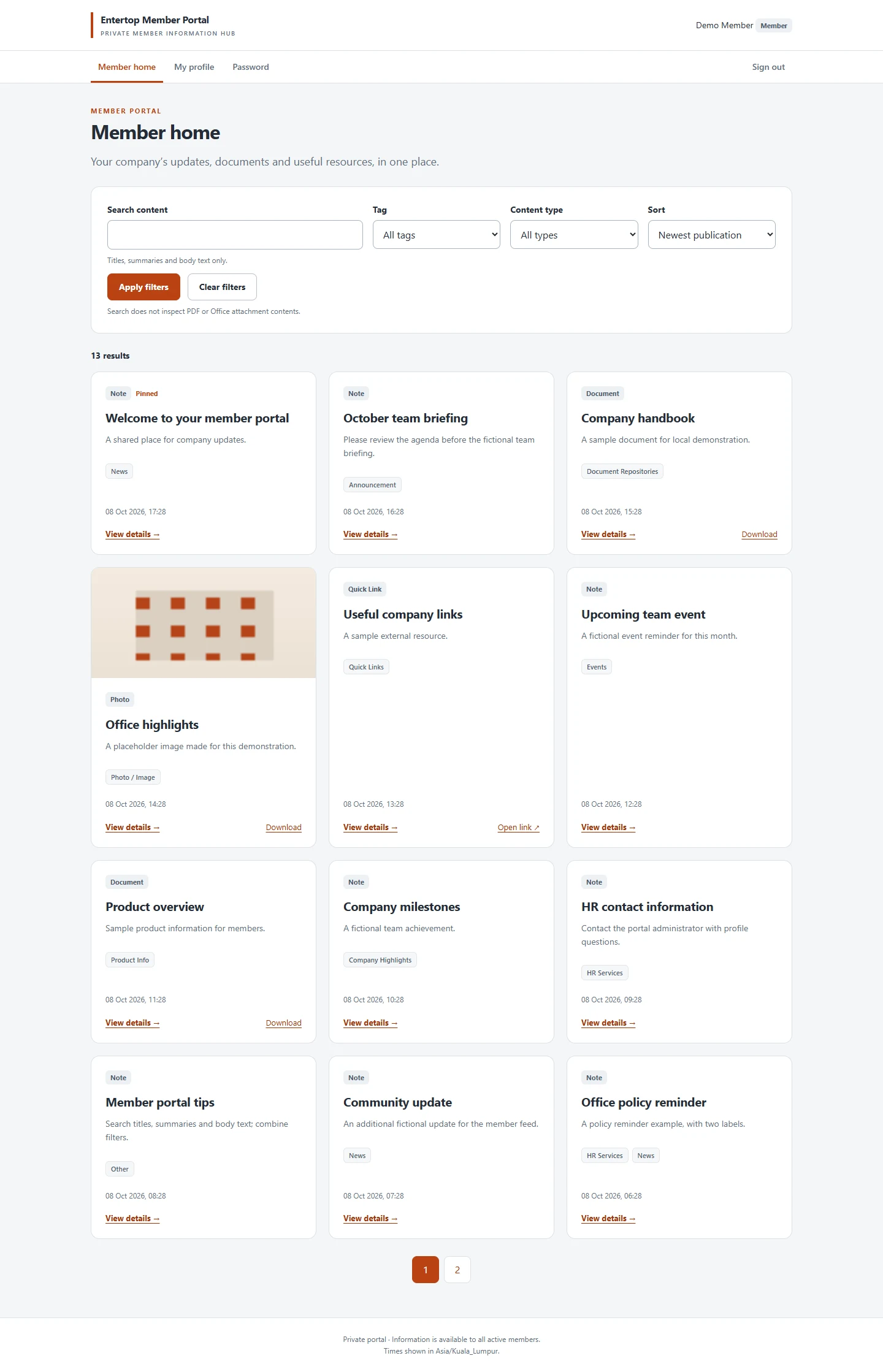
Use content types and tags such as News, Events, Product Info and Company Highlights.
Prepare drafts, publish updates, pin key items and archive older information.
03 / Standard features
A practical set of tools for organisations that need to publish information and make it available to approved members.
Administrator-created accounts with password-protected login. Administrators manage roles, activation, deactivation and temporary password resets.
Publish notes with titles, summaries and plain-text descriptions. Pin important items.
Share PDF and TXT attachments with signed-in members.
Publish JPEG, PNG and WEBP photos and images alongside relevant content.
Search titles, summaries and body text; filter by a tag or content type; sort by date or title.
Help members find useful external webpages; linked systems do not sync information.
Create drafts, preview saved content, publish, edit and archive content.
Members edit their name, phone, department, job title and password; admins control email, role and status.
Works through desktop, tablet and mobile browsers; no native app is included.
04 / Product walkthrough
Two views, one shared information library. These are genuine V1 screens from local tests using fictional demo data.
Browse the published library, see pinned updates, search and filter content, view photos and documents, download supported files, open Quick Links and update personal details.
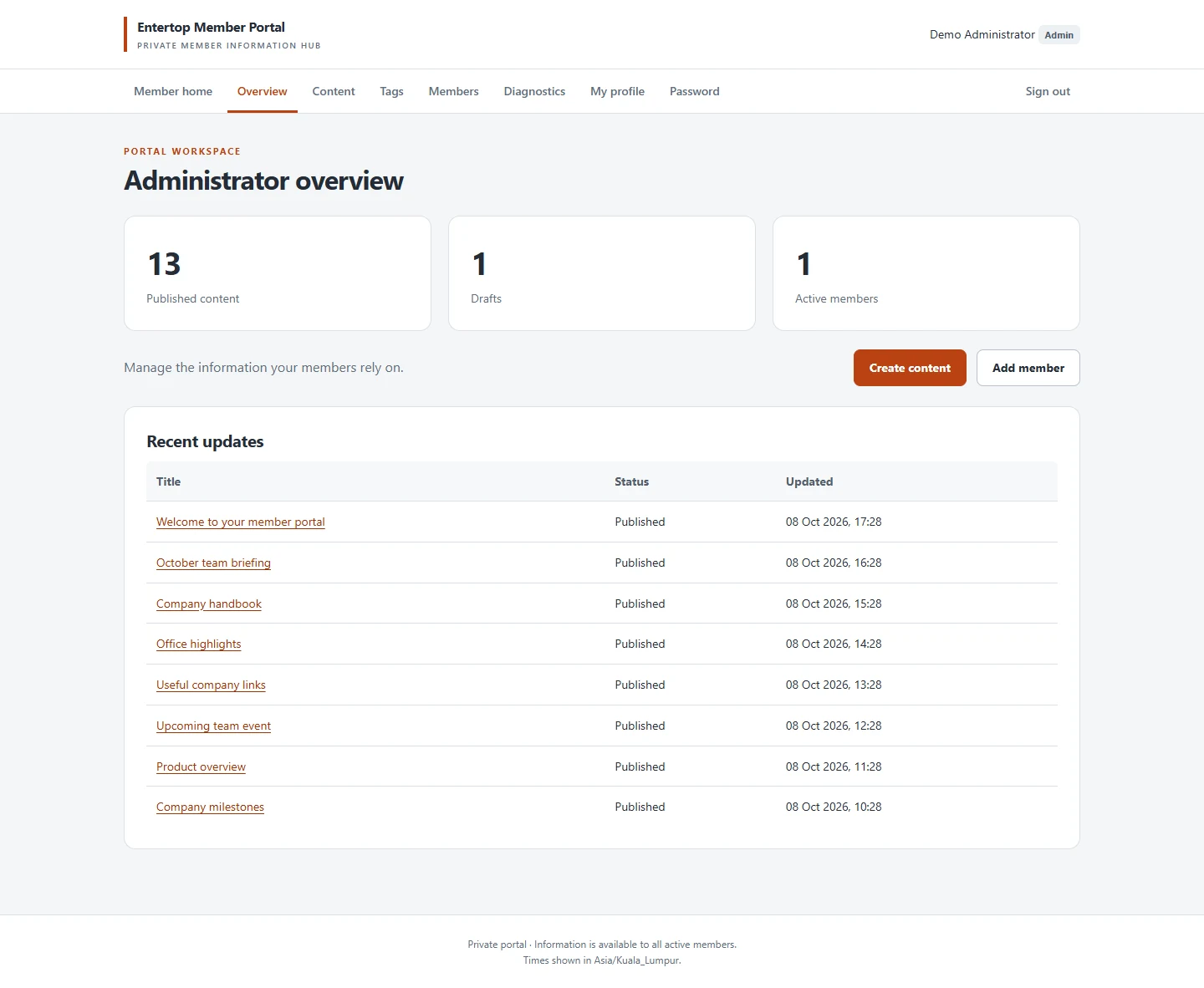
Create and manage member accounts, manage tags, create, preview, publish and archive content, and use the basic admin overview.
Demo requests are reviewed before credentials are issued. Member demos are manually approved; administrator demonstrations are supervised.
05 / Who it suits
Internal announcements, company news, reference documents, event information and useful links for an authorised shared audience.
Association notices, event information, reference materials, photos and documents. This does **not** include registration, subscription renewals or payments.
Product descriptions, PDF brochures, images and external links for a common approved member group. No per-dealer or per-customer content segregation.
One shared audience: All active members can view the same published content. If different teams or customers require different access, ask about custom portal development.
06 / Getting started
Tell us who will use the portal, what information you need to share and how it will be managed.
Confirm account allowances, hosting, configuration, pricing and support responsibilities in writing.
Set the agreed portal title, initial tags and deployment settings; administrators create accounts.
Administrators publish notes, documents, images and Quick Links; approved members sign in to view them.
Edit, pin and archive content as your organisation's information changes.
07 / Setup & subscription
Our approach combines a one-time portal setup with a monthly or annual subscription arrangement. Each proposal confirms the agreed software access, setup activities, usage allowances and any operational services.
Agreed deployment, configuration and initial account work; training/content assistance only if included in quotation.
Software licence/access and only those hosting, maintenance, backup and support services expressly set out in the agreement.
Specific branding, different access controls, integrations and bespoke functionality require separate assessment and quotation.
Member allowances, storage, traffic, service levels, backups, renewal and exit/data arrangements are specified in the proposal.
08 / Standard or custom
STANDARD V1
SEPARATELY SCOPED
For requirements beyond the standard shared library:
Subject to technical assessment and a separate quotation. For a bespoke association system, explore membership management portal development.
09 / Your questions
A browser-based information hub where approved users sign in to access published updates, documents, images and useful links.
Yes. Administrators can manage accounts, tags, content and attachments through the portal interface.
No. Administrators create accounts. Public registration and automated account invitation/password reset emails are not included.
No. All active members see the same published library. Department-specific or individual permissions require a separately scoped solution.
PDF, TXT, JPEG, PNG and WEBP, up to five files per item and 10 MiB per file. Office documents, video and ZIP uploads are not included.
No. Search covers titles, summaries and content body text, not attachment contents.
No. The standard portal is for publishing resources, not HR/payroll/leave workflows, CRM, payments or renewals.
Yes, through a responsive mobile browser; there is no native mobile app.
Portal title, initial tags and deployment settings can be configured. Logos, colours, bespoke layouts, multilingual features and integrations require separate assessment.
Only where explicitly included in the quotation and service agreement.
The commercial approach is a one-time setup plus monthly or annual subscription. Request a quotation for confirmed scope and service terms.
Yes. Additional requirements can be reviewed and separately quoted, subject to technical assessment.
10 / Next step
Bring your organisation's published updates, documents and shared resources together in one private portal.
Tell us who will use it and what you need to share. We'll review whether the standard portal is a suitable fit.
Entertop reviews your requirements before issuing demo access or preparing a quotation. No demo account is created automatically.
Need separate access for different groups? We'll flag your enquiry for custom portal assessment.